
Note
Go to the end to download the full example as a Python script or as a Jupyter notebook..
Cell tracking example#
This example demonstrates how the track layer is used for visualizing cell tracking data, by displaying 2D + time dataset of cells with colored properties for track-id.
Thanks to Dr. Alessia Ruggieri and Philipp Klein, Centre for Integrative Infectious Disease Research (CIID), University Hospital Heidelberg, Germany for the data. You can find the data on: https://doi.org/10.5281/zenodo.15597019
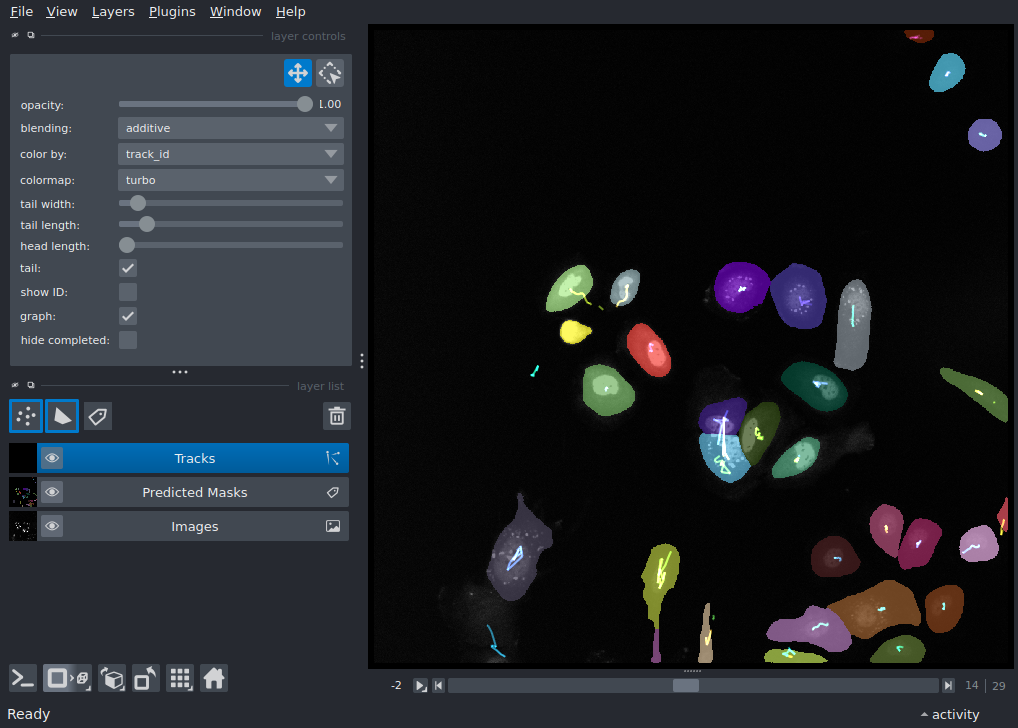
Downloading...
From: https://drive.google.com/uc?id=1tuHI_io67gVdFZBA5E97fXrAWaxI2cqi
To: /home/runner/work/docs/docs/.cache/napari cell tracking example/tmp39qxdxfe

  0%|          | 0.00/455k [00:00<?, ?B/s]
100%|██████████| 455k/455k [00:00<00:00, 23.1MB/s]
Downloading...
From: https://drive.google.com/uc?id=1qhAbIZiEKfo_a38YFtw7KJ3JjEhicDeJ
To: /home/runner/work/docs/docs/.cache/napari_cell_tracking_example/tmp48unurnp

  0%|          | 0.00/15.7M [00:00<?, ?B/s]
 87%|████████▋ | 13.6M/15.7M [00:00<00:00, 136MB/s]
100%|██████████| 15.7M/15.7M [00:00<00:00, 131MB/s]

/tmp/tmpfv5qrj8n/general_2d.zip:   0%|          | 0.00/38.0M [00:00<?, ?iB/s]
/tmp/tmpfv5qrj8n/general_2d.zip:   9%|▉         | 3.47M/38.0M [00:00<00:00, 36.4MiB/s]
/tmp/tmpfv5qrj8n/general_2d.zip:  26%|██▋       | 10.0M/38.0M [00:00<00:00, 44.9MiB/s]
/tmp/tmpfv5qrj8n/general_2d.zip:  53%|█████▎    | 20.0M/38.0M [00:00<00:00, 57.1MiB/s]
/tmp/tmpfv5qrj8n/general_2d.zip:  79%|███████▉  | 30.0M/38.0M [00:00<00:00, 65.0MiB/s]
/tmp/tmpfv5qrj8n/general_2d.zip: 100%|██████████| 38.0M/38.0M [00:00<00:00, 66.1MiB/s]

Extracting features:   0%|          | 0/30 [00:00<?, ?it/s]
Extracting features:  17%|█▋        | 5/30 [00:00<00:00, 46.86it/s]
Extracting features:  33%|███▎      | 10/30 [00:00<00:00, 47.27it/s]
Extracting features:  50%|█████     | 15/30 [00:00<00:00, 47.93it/s]
Extracting features:  67%|██████▋   | 20/30 [00:00<00:00, 47.39it/s]
Extracting features:  83%|████████▎ | 25/30 [00:00<00:00, 46.76it/s]
Extracting features: 100%|██████████| 30/30 [00:00<00:00, 47.57it/s]

Building windows:   0%|          | 0/27 [00:00<?, ?it/s]
Building windows: 100%|██████████| 27/27 [00:00<00:00, 17371.71it/s]

Computing associations:   0%|          | 0/27 [00:00<?, ?it/s]
Computing associations:  11%|█         | 3/27 [00:00<00:00, 25.23it/s]
Computing associations:  22%|██▏       | 6/27 [00:00<00:00, 25.43it/s]
Computing associations:  33%|███▎      | 9/27 [00:00<00:00, 25.42it/s]
Computing associations:  44%|████▍     | 12/27 [00:00<00:00, 25.65it/s]
Computing associations:  56%|█████▌    | 15/27 [00:00<00:00, 25.63it/s]
Computing associations:  67%|██████▋   | 18/27 [00:00<00:00, 25.27it/s]
Computing associations:  78%|███████▊  | 21/27 [00:00<00:00, 25.08it/s]
Computing associations:  89%|████████▉ | 24/27 [00:00<00:00, 25.18it/s]
Computing associations: 100%|██████████| 27/27 [00:01<00:00, 25.58it/s]
Computing associations: 100%|██████████| 27/27 [00:01<00:00, 25.43it/s]

  0%|          | 0/30 [00:00<?, ?it/s]
29 edges in frame 0  Total edges: 29:   0%|          | 0/30 [00:00<?, ?it/s]
25 edges in frame 1  Total edges: 54:   0%|          | 0/30 [00:00<?, ?it/s]
25 edges in frame 2  Total edges: 79:   0%|          | 0/30 [00:00<?, ?it/s]
30 edges in frame 3  Total edges: 109:   0%|          | 0/30 [00:00<?, ?it/s]
29 edges in frame 4  Total edges: 138:   0%|          | 0/30 [00:00<?, ?it/s]
29 edges in frame 5  Total edges: 167:   0%|          | 0/30 [00:00<?, ?it/s]
29 edges in frame 6  Total edges: 196:   0%|          | 0/30 [00:00<?, ?it/s]
31 edges in frame 7  Total edges: 227:   0%|          | 0/30 [00:00<?, ?it/s]
31 edges in frame 8  Total edges: 258:   0%|          | 0/30 [00:00<?, ?it/s]
30 edges in frame 9  Total edges: 288:   0%|          | 0/30 [00:00<?, ?it/s]
29 edges in frame 10  Total edges: 317:   0%|          | 0/30 [00:00<?, ?it/s]
28 edges in frame 11  Total edges: 345:   0%|          | 0/30 [00:00<?, ?it/s]
27 edges in frame 12  Total edges: 372:   0%|          | 0/30 [00:00<?, ?it/s]
28 edges in frame 13  Total edges: 400:   0%|          | 0/30 [00:00<?, ?it/s]
31 edges in frame 14  Total edges: 431:   0%|          | 0/30 [00:00<?, ?it/s]
31 edges in frame 15  Total edges: 462:   0%|          | 0/30 [00:00<?, ?it/s]
30 edges in frame 16  Total edges: 492:   0%|          | 0/30 [00:00<?, ?it/s]
30 edges in frame 17  Total edges: 522:   0%|          | 0/30 [00:00<?, ?it/s]
31 edges in frame 18  Total edges: 553:   0%|          | 0/30 [00:00<?, ?it/s]
31 edges in frame 19  Total edges: 584:   0%|          | 0/30 [00:00<?, ?it/s]
30 edges in frame 20  Total edges: 614:   0%|          | 0/30 [00:00<?, ?it/s]
33 edges in frame 21  Total edges: 647:   0%|          | 0/30 [00:00<?, ?it/s]
32 edges in frame 22  Total edges: 679:   0%|          | 0/30 [00:00<?, ?it/s]
31 edges in frame 23  Total edges: 710:   0%|          | 0/30 [00:00<?, ?it/s]
30 edges in frame 24  Total edges: 740:   0%|          | 0/30 [00:00<?, ?it/s]
28 edges in frame 25  Total edges: 768:   0%|          | 0/30 [00:00<?, ?it/s]
28 edges in frame 26  Total edges: 796:   0%|          | 0/30 [00:00<?, ?it/s]
28 edges in frame 27  Total edges: 824:   0%|          | 0/30 [00:00<?, ?it/s]
27 edges in frame 28  Total edges: 851:   0%|          | 0/30 [00:00<?, ?it/s]


Greedily matched edges:   0%|          | 0/851 [00:00<?, ?it/s]
Greedily matched edges:  99%|█████████▉| 845/851 [00:00<00:00, 185754.03it/s]

Converting graph to CTC results:   0%|          | 0/53 [00:00<?, ?it/s]
Converting graph to CTC results: 100%|██████████| 53/53 [00:00<00:00, 1674.46it/s]

Computing centroids:   0%|          | 0/30 [00:00<?, ?it/s]
Computing centroids:  67%|██████▋   | 20/30 [00:00<00:00, 192.20it/s]


Converting CTC to napari tracks:   0%|          | 0/53 [00:00<?, ?it/s]
from pathlib import Path

import numpy as np
import pooch
import tifffile
from trackastra.model import Trackastra
from trackastra.tracking import ctc_to_napari_tracks, graph_to_ctc

import napari

# Create temporary directory
tmp_dir = Path(pooch.os_cache('napari-cell-tracking-example'))
tmp_dir.mkdir(parents=True, exist_ok=True)

# Extract silver truth data for trackastra
st_url = "doi:10.5281/zenodo.15852284/masks_pred.npz"
st_path = pooch.retrieve(
    url=st_url,
    fname="masks_pred.npz",
    known_hash=None,
    path=pooch.os_cache("napari cell tracking example")
)

# Extract raw tif files for trackastra
tif_url = "doi:10.5281/zenodo.17643282/01(1).zip"
tif_file = pooch.retrieve(
    url=tif_url,
    fname="01(1).zip",
    known_hash=None,
    path=pooch.os_cache("napari_cell_tracking_example"),
    processor=pooch.Unzip(),
)

# Load the downloaded masks
masks_npz = np.load(st_path)
masks = masks_npz['masks']

# Sort through images and stack them
imgs = sorted(tif_file)

images = np.stack([
        tifffile.imread(fn) for fn in imgs
        ])

# Initiate trackastra model
model = Trackastra.from_pretrained("general_2d", device='cpu')

# Generate tracks
graph, *_ = model.track(imgs=images, masks=masks, mode='greedy')
tracks_df, tracked_masks = graph_to_ctc(graph=graph, masks_original=masks)

napari_tracks, napari_graph = ctc_to_napari_tracks(segmentation=tracked_masks, man_track=tracks_df)

# Add Napari viewer
viewer = napari.Viewer()
viewer.add_image(images, name='Images')
viewer.add_labels(masks, name='Predicted Masks')
viewer.add_tracks(napari_tracks, graph=napari_graph, name="Tracks")

if __name__ == "__main__":
    napari.run()
Total running time of the script: (0 minutes 14.755 seconds)